Free Chrome extension · v1.1.0
Scroll Facebook without the ads.
FB Ad Blocker hides sponsored posts the moment they show up in your feed, so you see friends, groups and pages, not paid promotions.
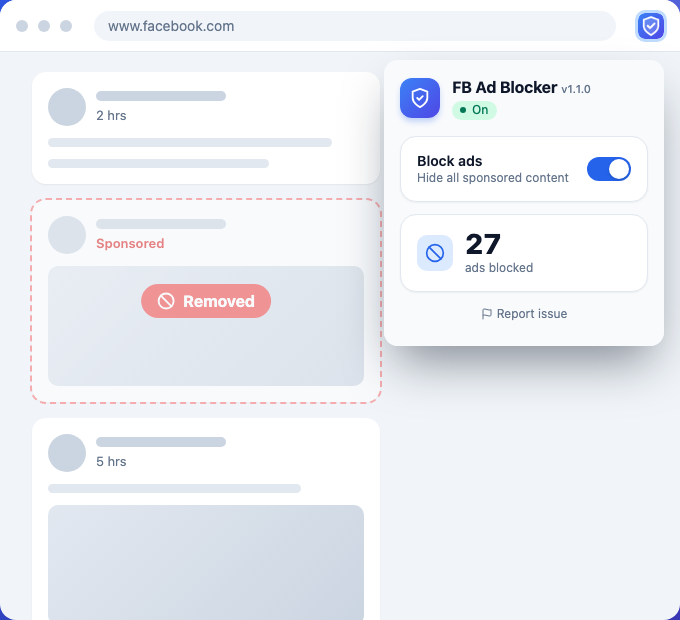
FB Ad Blocker hides sponsored posts the moment they show up in your feed, so you see friends, groups and pages, not paid promotions.
See it in action
Features
Everything you need to keep sponsored content out of your way, and nothing you don't.
Sponsored posts disappear automatically, including the ones that load as you keep scrolling.
The "Sponsored" ad box in the right column is hidden too.
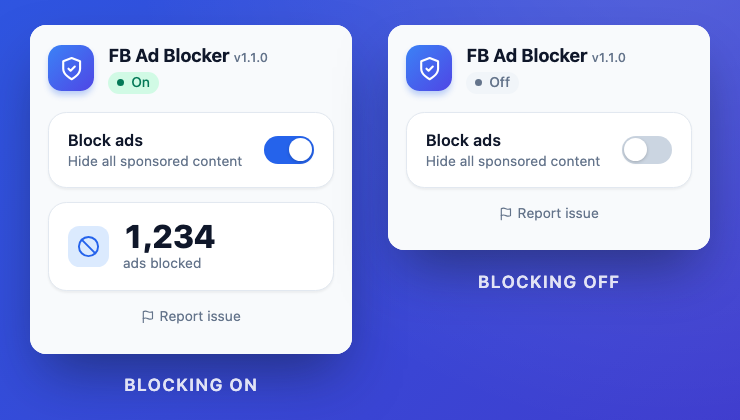
Pause or resume blocking from the toolbar popup, with a live counter of ads blocked.
Reads the hidden "Sponsored" label Facebook uses to disguise ads, instead of fragile filter lists.
No account, no analytics. Your setting and counter never leave your browser.
No external scripts and no filter lists to download. It just runs on www.facebook.com.
How it works
Privacy policy
FB Ad Blocker does not collect, store on a server, sell or share any personal data.
Two values, saved only in Chrome's local extension storage on your device:
Questions or problems? Use the issue report form.
Last updated: November 19, 2026
FAQ
Yes. It's free, with no account, subscription or in-app purchases.
FB Ad Blocker recognizes the sponsored label in English ("Sponsored") and Vietnamese ("Được tài trợ"). If Facebook is set to another language, sponsored posts may not be detected yet.
Facebook changes its layout often. Open the extension popup and click "Report issue", or use the report form, so we can update detection.
No. It's a Chrome extension for desktop, and it runs on www.facebook.com.
Posts that were already removed stay hidden until you reload the page. New ads will show while blocking is off.
No. FB Ad Blocker is an independent extension and is not affiliated with, endorsed by, or sponsored by Meta Platforms, Inc.

Install FB Ad Blocker and scroll Facebook without sponsored posts.